
"What ECU does my car have?" is the first question behind almost every tuning request, and the answer is rarely just the car's model and year. The same model can ship with two or three different ECUs, and a unit may have been replaced or updated during the car's life. This guide shows where to find the identification data, how to read it and which mistakes lead to a file prepared for the wrong ECU.
Why the car's model is not enough
Manufacturers change ECU suppliers and generations within a single model run. A 2.0 diesel built in March and the same engine built in October can carry different hardware. Add a previous repair, a swapped unit or an earlier software update, and the model name alone points to several possible ECUs. That is why a file request should always include the ECU's own identification data.
Step 1: Read the ECU label
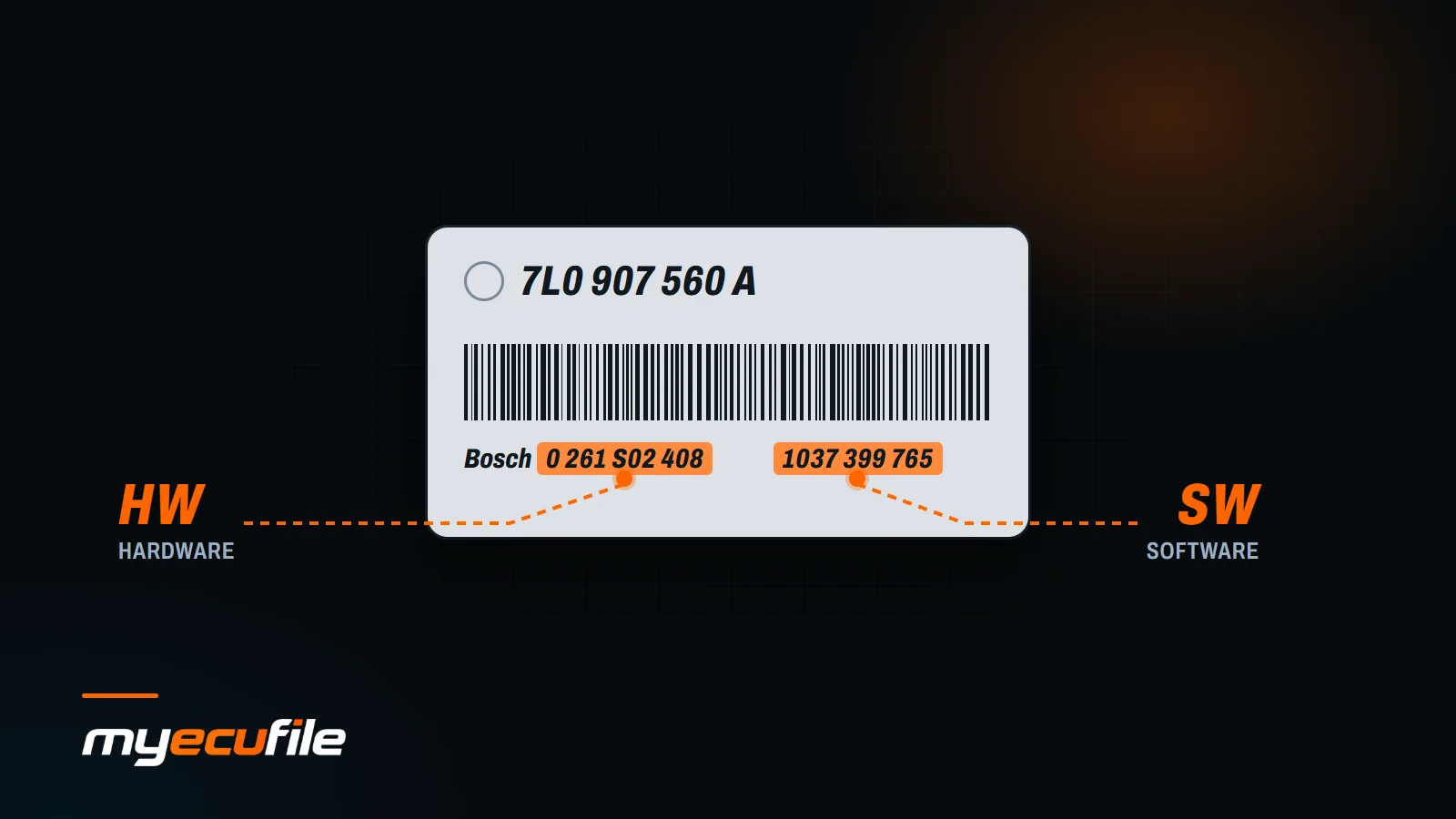
Most ECUs carry a sticker on the housing. It usually shows:
- Manufacturer: Bosch, Continental (Siemens/VDO), Delphi, Denso, Marelli, Valeo and others.
- Hardware (HW) number: identifies the physical unit. Example: Bosch hardware numbers are usually ten digits, written like 0 281 0xx xxx for diesel ECUs and 0 261 xxx xxx for petrol ECUs.
- Software (SW) number: identifies the software version inside the unit. On many Bosch ECUs it is a ten-digit number often starting with 1037.
- Vehicle manufacturer part number: the carmaker's own number, for example the long alphanumeric code used by the VAG group.
Take a sharp, well-lit photo of the label before you do anything else. Several numbers on a sticker look alike, and a blurry photo is the most common reason a request stalls.
Step 2: Read the ECU's own identification data
The sticker shows what the unit was when it left the factory. The software inside can differ. Your read or diagnostic tool can display the identification block directly from the ECU, including the software version it is running today. Compare it with the label:
- Same numbers: the unit most likely has never been updated or modified.
- Different SW number: the ECU has been updated by the dealer or tuned before. Mention this in your request.
- Different HW family than expected: the unit may have been replaced. Do not assume the car's original specification.
Step 3: Identify the ECU from the file
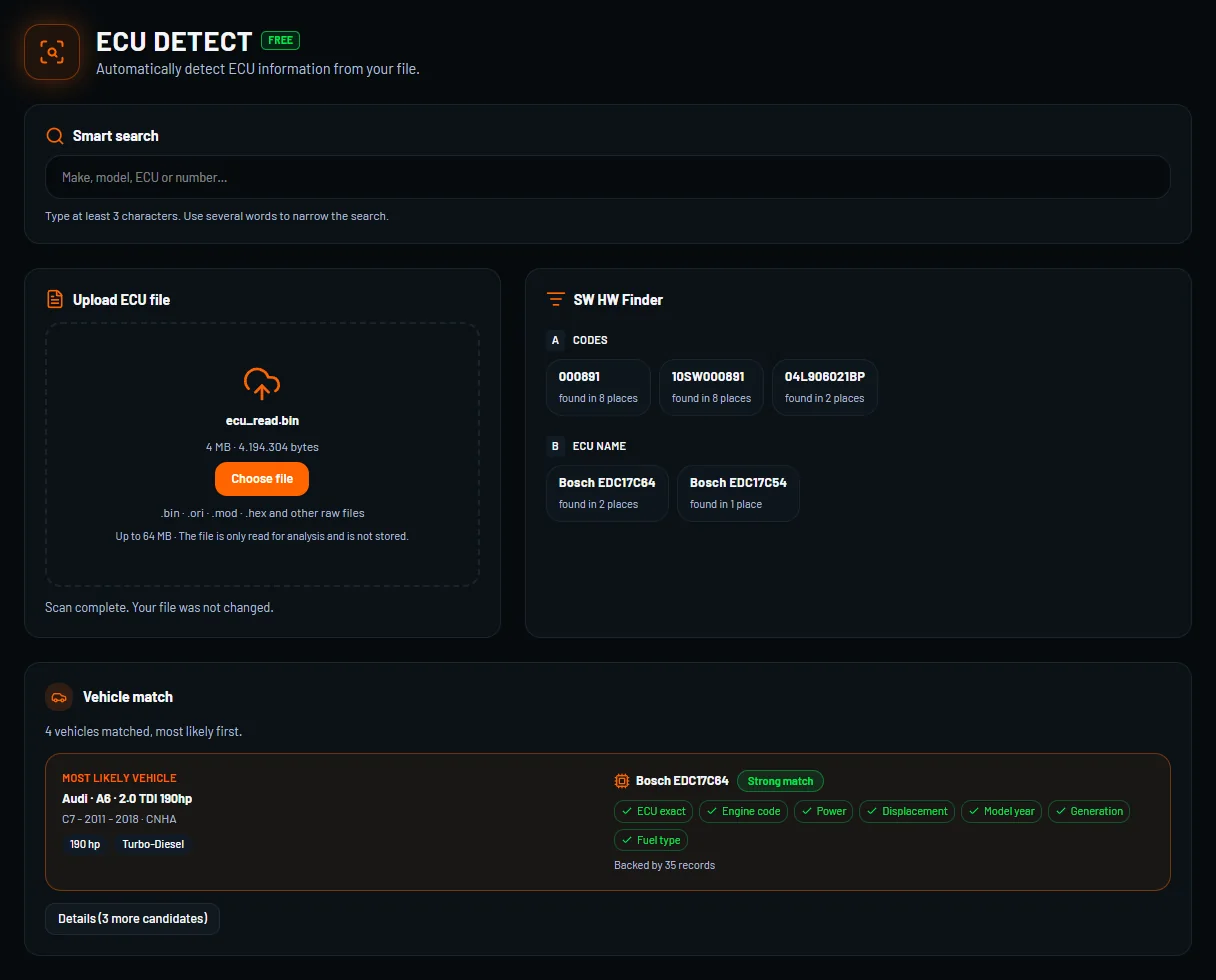
If you already have the read file, you do not have to guess. The ECU Detect tool in the MyEcuFile panel is free and reads identification information such as the ECU type, hardware and software numbers from the uploaded file. This is also a good way to confirm that your read is complete and belongs to the car in front of you.
Step 4: Pick the right read method
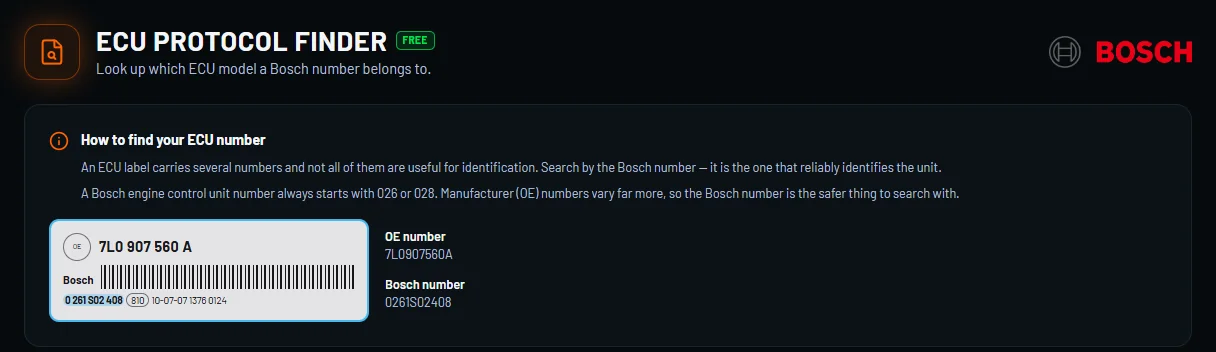
Once the ECU is known, the next question is how to read it. The free ECU Protocol Finder helps you find the read protocol for your ECU, and the ECU Locator Pro and OBD Locator Pro tools show where the ECU and the diagnostic port sit in the vehicle. Not sure the vehicle is covered? Browse the vehicle catalogue to check the make, model and engine.
Common ECU families at a glance
| Family | Fuel | Typical manufacturer |
|---|---|---|
| EDC15, EDC16, EDC17 | Diesel | Bosch |
| ME7, MED17 | Petrol | Bosch |
| SID, PCR | Diesel | Continental / Siemens |
| DCM | Diesel | Delphi |
| IAW, MJD | Petrol / diesel | Marelli |
The family name is only a starting point. Two ECUs of the same family can still have different hardware revisions and different software, so the full HW and SW numbers are what matter.
Mistakes that cost time
- Relying on the VIN only. The VIN tells you how the car was built, not what is inside the ECU today.
- Mixing up HW and SW numbers. Write both down and label them clearly in your request.
- Ignoring an earlier update. If the ECU was flashed before, say so. It changes how the file is prepared.
- Sending a partial read. A file that does not contain the complete memory can hide the identification block. Keep a full backup. If you ever need to return to factory software, the Original ECU File service covers it.
- Skipping the photo. A clear label photo lets us confirm the numbers in seconds.
What to include in your request
- Make, model, year, engine and gearbox.
- ECU manufacturer, HW number and SW number (from the label and from the tool).
- A photo of the ECU label.
- The read method and tool used.
- Any previous tune, repair or ECU replacement.
Ready to order? The Chip Tuning File Service page explains what you receive, and pricing lists the credit cost.
Frequently asked questions
Where is the ECU in my car?
It depends on the model. Common places are the engine bay near the battery or bulkhead, under the dashboard and behind the glovebox. The ECU Locator Pro tool in the panel helps you find it for your vehicle.
Can I identify the ECU without removing it?
Often yes. Many ECUs report their identification data over the diagnostic port, so you can read the HW and SW numbers with a compatible tool while the ECU stays in the car.
Does a different SW number mean the ECU was tuned?
Not necessarily. Dealers also update software during service. A different number simply means the software is not the one the ECU left the factory with, so mention it in your request.
What if the label is damaged or missing?
Read the identification data with your tool or upload your read file to ECU Detect. The information stored inside the ECU is usually more reliable than a worn sticker.